Lich:Script Ebounty: Difference between revisions
(→Changelog: update to v1.9.0) |
(add Third-Party Software category) |
||
| (2 intermediate revisions by the same user not shown) | |||
| Line 1: | Line 1: | ||
{{3rd-party}} |
{{3rd-party}} |
||
{{TOCright| limit=2}} |
|||
Ebounty is management script for handling Bounties from the [[Adventurer's Guild]]. |
|||
EBounty is a management script for automating [[Adventurer's Guild]] bounty tasks. It handles the full lifecycle of obtaining, executing, and turning in bounties. |
|||
Afk scripting on any server but Shattered is in violation of game policy. |
|||
'''Important:''' AFK scripting on any server other than Shattered is a violation of game policy. |
|||
==What Does Ebounty Do?== |
|||
''This page documents EBounty '''v1.12.3'''.'' |
|||
Ebounty will handle the management for Adventurer's Guild tasks. It utilizes a primary workflow of |
|||
<PRE>Find acceptable tasks. If acceptable task can not be found, execute the default Bigshot routine. If a task is available, execute the task and then turn in if not saturated. When bounty timer is up, grab a new task. Repeat. </PRE> |
|||
==Overview== |
|||
==How Do I Get It?== |
|||
EBounty automates the Adventurer's Guild bounty workflow: |
|||
Eloot can be downloaded via <CODE>;repo download ebounty</CODE> |
|||
<PRE> |
|||
As a script in active development and with the constant state of changes in the game, it is recommended to set ebountyand all Elanthia-Online scripts to auto-update via <CODE>;repo set-updatable ebounty</CODE> |
|||
1. Request a bounty from the Adventurer's Guild. |
|||
2. If the bounty type is acceptable (based on your settings), execute the task. |
|||
3. If no acceptable bounty is available, run a Bigshot hunting routine using your default profile. |
|||
4. Once the bounty is complete, turn it in (if not saturated on experience). |
|||
5. When the bounty cooldown expires, request a new task. |
|||
6. Repeat. |
|||
</PRE> |
|||
EBounty relies on [[Bigshot]] for all combat-related operations. '''You must configure your Bigshot profiles before setting up EBounty.''' It also uses companion scripts for specific task types: <CODE>;echild</CODE> for rescue tasks, <CODE>;escortgo2</CODE> for escort tasks, <CODE>;eherbs</CODE> for healing, and <CODE>;eloot</CODE> for selling loot. Each of these can be overridden with a custom script of your choice. |
|||
==How Do I Make it GO!?== |
|||
Initial setup is accessed through ;ebounty setup. There you will see a configuration window with various tabs to configure for your guild tasks. Presently Ebounty is designed to utilize [[Bigshot]] for it's attack related parameters, and will run a bigshot routine when there is no available active bounty. |
|||
'''Bigshot profiles need to be configured inside Bigshot before they can be utilized in Ebounty'''. |
|||
==Installation== |
|||
As with most scripts, using a SETUP command will open a graphical user interface for configuring the script. Use ;ebounty setup to open this dialog. This will open a window with the following tabs: |
|||
* General - This is where you tell ebounty what type of bounties you are looking for and any task limits. |
|||
* Escort - Set up your escort and location preferences |
|||
* Profiles - Exclusions and which creatures you do/do not which to hunt. |
|||
Download EBounty from the script repository: |
|||
<CODE>;repo download ebounty</CODE> |
|||
Since EBounty is actively developed and game changes can affect its functionality, it is strongly recommended to enable auto-updates: |
|||
<CODE>;repo set-updatable ebounty</CODE> |
|||
===Lich Version Requirement=== |
|||
EBounty requires '''Lich 5.19.0 or newer'''. The script checks your Lich version on startup and refuses to run (with an update notice) on anything older. Newer releases occasionally raise this floor, so keep Lich current alongside the script. |
|||
===Required Dependencies=== |
|||
EBounty will check for and notify you of any missing dependencies when it starts. The following scripts are needed based on your configuration: |
|||
* '''bigshot''' — Always required (unless using "Just the Basics" mode) |
|||
* '''eherbs''' — Required for healing unless you specify a custom healing script or enable "Skip healing" |
|||
* '''eloot''' — Required for selling unless you specify a custom selling script |
|||
* '''echild''' — Required if you enable Rescue bounties (unless you specify a custom rescue script) |
|||
* '''escortgo2''' — Required if you enable Escort bounties (unless you specify a custom escort script) |
|||
The dependency check is skipped entirely when "Just the basics" is enabled (either as a saved setting or via <CODE>;ebounty basic</CODE>). |
|||
==Getting Started== |
|||
Open the configuration window with: |
|||
<CODE>;ebounty setup</CODE> |
|||
This opens a GUI with eight tabs: '''General''', '''Resting''', '''Foraging''', '''Heirloom''', '''Bandits''', '''Escort''', '''Exclusions''', and '''Profiles'''. All changes in the GUI are saved automatically. |
|||
At minimum, you need to: |
|||
# Enable the bounty types you want on the '''General''' tab. |
|||
# Select a '''Gem/Default''' profile on the '''Profiles''' tab (this is the Bigshot profile used between bounties). |
|||
# Add creature names and associate Bigshot profiles on the '''Profiles''' tab for any creatures you expect to hunt. |
|||
Once configured, start EBounty by simply running: |
|||
<CODE>;ebounty</CODE> |
|||
'''Note:''' EBounty must be started from a mapped room. |
|||
Every option in the GUI also has a setting name that can be changed from the command line — see [[#Command Line Interface (CLI)|Command Line Interface]] below. |
|||
==General Tab== |
|||
The General tab controls which bounty types you accept, core behavior options, support scripts, and task limits. |
|||
==The General Tab== |
|||
===Bounty Types=== |
===Bounty Types=== |
||
Enable or disable each bounty type using the checkboxes. When a bounty type is unchecked, EBounty will automatically ask the Guild to remove that type if received. Available types: |
|||
* Bounty Types - This is where you will define which bounty types you wish. Enabling the checkboxes will tell ebounty which types of bounties you wish to get and which ones to drop. |
|||
Ebounty will use ;echild for children tasks and ;ego2 for escort tasks. |
|||
{| class="wikitable" |
|||
|- |
|||
! Bounty Type !! CLI value !! Description |
|||
|- |
|||
| Boss Creature || <CODE>boss_culling</CODE> || Hunt a dangerous (boss-level) creature |
|||
|- |
|||
| Culling || <CODE>culling</CODE> || Kill a specified number of a particular creature |
|||
|- |
|||
| Escort || <CODE>escort</CODE> || Escort an NPC between two towns (uses <CODE>;escortgo2</CODE>) |
|||
|- |
|||
| Foraging || <CODE>foraging</CODE> || Gather herbs from the wild (see the Foraging tab for options) |
|||
|- |
|||
| Gem Collecting || <CODE>gem_collecting</CODE> || Collect specific gems by hunting creatures |
|||
|- |
|||
| Heirloom (loot) || <CODE>heirloom_loot</CODE> || Recover an heirloom by looting a creature |
|||
|- |
|||
| Heirloom (search) || <CODE>heirloom_search</CODE> || Recover an heirloom by searching rooms (see the Heirloom tab for options) |
|||
|- |
|||
| Kill Bandits || <CODE>kill_bandits</CODE> || Suppress bandit activity in an area (see the Bandits tab for options) |
|||
|- |
|||
| Rescue || <CODE>rescue</CODE> || Rescue a lost child (uses <CODE>;echild</CODE>) |
|||
|- |
|||
| Skinning || <CODE>skinning</CODE> || Collect creature skins |
|||
|} |
|||
===Misc Options=== |
|||
{| class="wikitable" |
|||
|- |
|||
! Option !! Setting name !! Description |
|||
|- |
|||
| Rest when mind full || <CODE>exp_pause</CODE> || When enabled, EBounty will return to your resting location once your experience pool is full. When disabled, it continues hunting until the bounty is complete or another rest condition (injury, low mana, etc.) is triggered. |
|||
|- |
|||
| Keep hunting || <CODE>keep_hunting</CODE> || When enabled and no creature-specific Bigshot profile is found, EBounty will use your Gem/Default profile to continue hunting instead of exiting. '''Cannot be used together with "Rest when mind full".''' |
|||
|- |
|||
| Skip healing || <CODE>skip_healing</CODE> || Disables automatic healing between tasks. |
|||
|- |
|||
| Run one bounty and quit || <CODE>once_and_done</CODE> || EBounty will complete a single bounty and then stop. |
|||
|- |
|||
| Get new bounty before quitting || <CODE>new_bounty_on_exit</CODE> || (Only applies when "Run one bounty and quit" is enabled; the checkbox is greyed out otherwise.) Grabs the next task from the Guild before exiting. |
|||
|- |
|||
| Just the basics || <CODE>basic</CODE> || Only picks up and turns in bounties based on your settings. No automatic hunting, healing, or other routines are performed. Useful if you want to manage combat yourself. Also skips the dependency check and the Gem/Default profile requirement, and returns you to the room you started in on exit. |
|||
|- |
|||
| Use vouchers || <CODE>use_vouchers</CODE> || EBounty will use Adventurer's Guild vouchers to reroll tasks until a desired bounty type is obtained. |
|||
|- |
|||
| Use bounty boosts || <CODE>use_boosts</CODE> / <CODE>boost_type</CODE> || Activates a bounty boost before hunting. Use the adjacent dropdown to select which bounty type to target when boosted (Any, Kill, Heirloom, Skin, Gem, Escort, Herb, Dangerous, Child, or Bandit). |
|||
|- |
|||
| Remove bounty if heirloom item is missing || <CODE>remove_heirloom</CODE> || If enabled and the heirloom item gets lost, EBounty will automatically remove the bounty. |
|||
|- |
|||
| Rejoin group before quitting || <CODE>return_to_group</CODE> || If you started EBounty while in a group, it will attempt to rejoin the group leader before exiting. |
|||
|- |
|||
| Ranger Track || <CODE>ranger_track</CODE> || (Rangers only — the checkbox is disabled for other professions.) Uses the Track ability on cooldown to locate bounty targets. |
|||
|} |
|||
===Support Scripts=== |
|||
These fields let you override the default helper scripts. Each field accepts a script name optionally followed by parameters, and multiple scripts may be separated by commas. |
|||
{| class="wikitable" |
|||
|- |
|||
! Field !! Setting name !! Default !! Description |
|||
|- |
|||
| Healing Script || <CODE>healing_script</CODE> || <CODE>eherbs</CODE> || Runs when your character is injured between tasks. |
|||
|- |
|||
| Death Recovery Script || <CODE>death_script</CODE> || ''(none)'' || Runs if your character dies. If configured, EBounty starts a watcher that stops bigshot/go2, runs this script, and restarts EBounty automatically with the same command-line arguments. If left blank, EBounty simply exits on death. |
|||
|- |
|||
| Selling Script || <CODE>selling_script</CODE> || <CODE>eloot</CODE> || Runs to sell loot and deposit silvers. |
|||
|- |
|||
| Hording Script || <CODE>hording_script</CODE> || ''(none)'' || Runs before a gem bounty (optional). Enter the script name followed by any necessary parameters (e.g., <CODE>HoardingScriptName param1 param2</CODE>). |
|||
|- |
|||
| Escort Script || <CODE>escort_script</CODE> || <CODE>escortgo2</CODE> || Handles escort bounty travel. |
|||
|- |
|||
| Rescue Script || <CODE>rescue_script</CODE> || <CODE>echild</CODE> || Handles child rescue bounties. |
|||
|- |
|||
| Gem History || <CODE>gem_history</CODE> || ''(none)'' || An optional script that runs after receiving a gem bounty, useful for tracking which gems are requested. |
|||
|} |
|||
===Task Limits=== |
===Task Limits=== |
||
Set maximum values for how many items to collect per bounty type. These caps help prevent excessively long tasks. All are spin buttons with a maximum of 100. |
|||
* Task Limits - Here you can define maximum number of tasks you want to accept |
|||
* '''Max Culling Kills''' (<CODE>culling_max</CODE>, default 30) — Maximum number of creatures to kill for a culling bounty. |
|||
* '''Max Gems''' (<CODE>gem_max</CODE>, default 30) — Maximum number of gems to collect. |
|||
* '''Max Herbs''' (<CODE>herb_max</CODE>, default 30) — Maximum number of herbs to forage. |
|||
* '''Max Skins''' (<CODE>skin_max</CODE>, default 30) — Maximum number of skins to collect. |
|||
* '''# of Extra Skins''' (<CODE>extra_skin</CODE>, default 0) — How many additional skins to collect beyond the bounty requirement before turning in. |
|||
== |
==Resting Tab== |
||
The Resting tab controls where your character rests between tasks and during downtime. '''Only one resting method can be active at a time''' — selecting one will deactivate the others. |
|||
* Rest when mind full - Will perform a bigshot attack, based on your default profile, and then return to your resting location once your mind is full. If disabled, ebounty will keep killing creatures until the bounty is or other rest condition like injury or mana are met. |
|||
* Run one bounty and quit - Ebounty will run a single bounty until successful and then quit. |
|||
* Use Vouchers - Ebounty will use advguild vouchers until a desired bounty type has been met |
|||
* Rest at random nodes in town - Will find a random [[supernode]] in town for resting |
|||
* Just the Basics- Will only get/drop tasks and not perform any other bounty related routines |
|||
* Selling script - Which script you want to sell. No arguments needed. Default is Eloot |
|||
* Healing script - Which healing script you want when injured. No arguments needed. Default is Eherb |
|||
* Resting Room - Define where you want to rest between activities. |
|||
== |
===Resting Methods=== |
||
{| class="wikitable" |
|||
Here you can define your travel preferences and which destinations to/from. |
|||
|- |
|||
! Option !! Setting name !! Description |
|||
|- |
|||
| Use Nearest Table || <CODE>table_rest</CODE> || Travels to the nearest mapped table and sits at it. |
|||
|- |
|||
| Use Bigshot Resting Room || <CODE>bigshot_rest</CODE> || Uses the resting room configured in your current Bigshot profile. |
|||
|- |
|||
| Use Custom Resting Area(s) || <CODE>custom_rest</CODE> + <CODE>resting_room</CODE> || Enter one or more room numbers (comma-separated) in the text field below. If multiple rooms are listed, one will be selected at random. Supports room IDs and UIDs. |
|||
|- |
|||
| Use Random Resting Areas || <CODE>rest_random</CODE> || Picks a random [[supernode]] in your current town, drawn from the per-town lists below. |
|||
|- |
|||
| Use Script to Handle Resting Location || <CODE>use_script</CODE> + <CODE>use_script_name</CODE> || Runs a custom script to manage where you rest. Enter the script name and any parameters in the field below (e.g., <CODE>myscript param1 param2</CODE>). |
|||
|} |
|||
If no resting method is selected, EBounty defaults to the Nexus (on Shattered) or town center (on Prime). |
|||
==The Profiles Tab== |
|||
This is the area to tell Ebounty how to hunt |
|||
===Per-Town Resting Locations=== |
|||
Below the resting method checkboxes, you can customize the random resting room pools for each town. Each field contains a comma-separated list of room IDs that EBounty will randomly choose from when using the "Use Random Resting Areas" option. Room IDs and UIDs are both accepted. |
|||
{| class="wikitable" |
|||
|- |
|||
! Town !! Setting name |
|||
|- |
|||
| Hinter Wilds || <CODE>hw_resting</CODE> |
|||
|- |
|||
| Icemule Trace || <CODE>icemule_resting</CODE> |
|||
|- |
|||
| Kharam Dzu (Teras) || <CODE>teras_resting</CODE> |
|||
|- |
|||
| Kraken's Fall || <CODE>kf_resting</CODE> |
|||
|- |
|||
| Mist Harbor || <CODE>fwi_resting</CODE> |
|||
|- |
|||
| River's Rest || <CODE>rr_resting</CODE> |
|||
|- |
|||
| Sailor's Grief || <CODE>contempt_resting</CODE> |
|||
|- |
|||
| Solhaven || <CODE>solhaven_resting</CODE> |
|||
|- |
|||
| Ta'Illistim || <CODE>illy_resting</CODE> |
|||
|- |
|||
| Ta'Vaalor || <CODE>vaalor_resting</CODE> |
|||
|- |
|||
| Wehnimer's Landing || <CODE>landing_resting</CODE> |
|||
|- |
|||
| Zul Logoth || <CODE>zul_resting</CODE> |
|||
|} |
|||
'''Note:''' the shipped defaults for several of these differ between Prime and Shattered (GSF), because the room IDs differ between instances. If you copy a settings file between instances, re-check these fields. |
|||
===Additional Resting Options=== |
|||
* '''Join Character''' (<CODE>join_player</CODE> + <CODE>join_list</CODE>) — When enabled, EBounty will try to join a specific character when resting. Enter one or more character names (comma-separated) in the field; it will try each in order. |
|||
* '''Use Buff Script''' (<CODE>use_buff_script</CODE> + <CODE>buff_script</CODE>) — When enabled, EBounty will run a buff script each time it returns to the resting location. Enter the script name and parameters below. |
|||
==Foraging Tab== |
|||
The Foraging tab configures how EBounty handles herb-gathering bounties. This tab has three sections. |
|||
===Foraging Options=== |
|||
Enable spells, abilities, and behaviors to use while foraging. These help with safety and efficiency. All of these are stored in the <CODE>forage_options</CODE> array setting; the CLI value for each is listed below. |
|||
{| class="wikitable" |
|||
|- |
|||
! Option !! CLI value !! Description |
|||
|- |
|||
| Run from creatures || <CODE>run</CODE> || Flee the room if creatures appear. |
|||
|- |
|||
| Hide when foraging || <CODE>hiding</CODE> || Attempt to hide before foraging. |
|||
|- |
|||
| Rogue Gambits: Stealth || <CODE>use_gambit</CODE> || Use the Rogue Stealth gambit while foraging. |
|||
|- |
|||
| Nature's Bounty (604) || <CODE>use_604</CODE> || Cast spell 604 to improve foraging results. |
|||
|- |
|||
| Nature's Bounty Evoke (604) || <CODE>use_604evoke</CODE> || Evoke spell 604 instead of casting. |
|||
|- |
|||
| Camouflage (608) || <CODE>use_608</CODE> || Cast spell 608 to stay hidden. |
|||
|- |
|||
| Celerity (506) || <CODE>use_506</CODE> || Cast spell 506 for faster actions. |
|||
|- |
|||
| Mass Calm (619) || <CODE>use_619</CODE> || Cast spell 619 to pacify creatures. |
|||
|- |
|||
| Wizard's Shield (919) || <CODE>use_919</CODE> || Cast spell 919 for additional protection. |
|||
|- |
|||
| Minor Sanctuary (213) || <CODE>use_213</CODE> || Cast spell 213 for a protective sanctuary. |
|||
|- |
|||
| Song of Peace (1011) || <CODE>use_1011</CODE> || Sing Song of Peace to prevent creature attacks. |
|||
|- |
|||
| Song of Tonis (1035) || <CODE>use_1035</CODE> || Sing Song of Tonis for speed. |
|||
|- |
|||
| Wall of Force (140) || <CODE>use_140</CODE> || Cast spell 140 for a defensive barrier. |
|||
|- |
|||
| Assume Aspect (650) Yierka || <CODE>use_650</CODE> || Assume the Yierka aspect for enhanced foraging. |
|||
|- |
|||
| Grasp of the Grave (709) || <CODE>use_709</CODE> || Cast spell 709 to immobilize creatures. |
|||
|- |
|||
| Sigil of Resolve || <CODE>use_resolve</CODE> || Activate the Sigil of Resolve. |
|||
|} |
|||
EBounty checks for the <CODE>nomagic</CODE> room tag before casting any of these. |
|||
===Pre-Foraging=== |
|||
* '''Pre-Foraging Commands''' (<CODE>forage_prep_commands</CODE>) — In-game commands to execute before each foraging session. |
|||
* '''Active Foraging Scripts''' (<CODE>forage_prep_scripts</CODE>) — Scripts to run alongside foraging (comma-separated for multiple). |
|||
===Post-Foraging=== |
|||
* '''Post-Foraging Commands''' (<CODE>forage_post_commands</CODE>) — In-game commands to execute after foraging is complete. |
|||
* '''Post-Foraging Scripts''' (<CODE>forage_post_scripts</CODE>) — Scripts to run after foraging finishes. |
|||
==Heirloom Tab== |
|||
The Heirloom tab configures how EBounty handles heirloom ''search'' bounties (where you must search rooms to find the item, not loot it from a creature). This tab mirrors the Foraging tab structure with three sections. |
|||
===Search Options=== |
|||
Enable spells and behaviors to use while searching for heirloom items. All of these are stored in the <CODE>heirloom_options</CODE> array setting. |
|||
{| class="wikitable" |
|||
|- |
|||
! Option !! CLI value !! Description |
|||
|- |
|||
| Run from creatures || <CODE>run</CODE> || Flee the room if creatures appear. |
|||
|- |
|||
| Presence (402) || <CODE>use_402</CODE> || Cast spell 402 to detect nearby items. |
|||
|- |
|||
| Minor Sanctuary (213) || <CODE>use_213</CODE> || Cast spell 213 for protection. |
|||
|- |
|||
| Song of Peace (1011) || <CODE>use_1011</CODE> || Sing Song of Peace to prevent attacks. |
|||
|- |
|||
| Celerity (506) || <CODE>use_506</CODE> || Cast spell 506 for speed. |
|||
|- |
|||
| Mass Calm (619) || <CODE>use_619</CODE> || Cast spell 619 to pacify creatures. |
|||
|- |
|||
| Wizard's Shield (919) || <CODE>use_919</CODE> || Cast spell 919 for protection. |
|||
|- |
|||
| Wall of Force (140) || <CODE>use_140</CODE> || Cast spell 140 for defense. |
|||
|- |
|||
| Grasp of the Grave (709) || <CODE>use_709</CODE> || Cast spell 709 to immobilize creatures. |
|||
|- |
|||
| Song of Tonis (1035) || <CODE>use_1035</CODE> || Sing Song of Tonis for speed. |
|||
|- |
|||
| Flag right hand || <CODE>use_right</CODE> || By default, found heirloom items are placed on the ground. Enable this to have the item go to your right hand instead. |
|||
|} |
|||
===Pre-Heirloom Searching=== |
|||
* '''Pre-Searching Commands''' (<CODE>heirloom_prep_commands</CODE>) — In-game commands to execute before beginning the search. |
|||
* '''Active Searching Scripts''' (<CODE>heirloom_prep_scripts</CODE>) — Scripts to run alongside searching. |
|||
===Post-Heirloom Searching=== |
|||
* '''Post-Searching Commands''' (<CODE>heirloom_post_commands</CODE>) — In-game commands to execute after the heirloom is found. |
|||
* '''Post-Searching Scripts''' (<CODE>heirloom_post_scripts</CODE>) — Scripts to run after searching finishes. |
|||
==Bandits Tab== |
|||
The Bandits tab configures how EBounty handles bandit suppression bounties. |
|||
===Wander Timing=== |
|||
* '''Wait this long before moving rooms''' (<CODE>wander_wait</CODE>, default <CODE>0.5</CODE>) — Controls the delay (in seconds) that EBounty waits in each room before moving on while searching for bandits. This is a decimal value. Adjust this to allow time for bandits to appear. |
|||
===Bad Room List=== |
|||
A twelve-row table where you can define rooms to avoid during bandit hunting. Each row has two fields: |
|||
* '''Location''' (<CODE>location1</CODE> … <CODE>location12</CODE>) — A reference label for the area (does not need to be exact; this is for your convenience only). |
|||
* '''Bad Room Numbers''' (<CODE>bad_room1</CODE> … <CODE>bad_room12</CODE>) — A comma-separated list of room IDs or UIDs to skip in that area (e.g., <CODE>228, 188, u76564564</CODE>). UIDs are supported and recommended for instance compatibility. |
|||
Twelve locations can be configured so you can exclude problematic rooms across all areas where bandits spawn. |
|||
===Crawl Area Cap=== |
|||
Bandit and location-based bounties are capped at '''100 rooms''' of hunting area. If the bounty location maps to more rooms than that, EBounty walks outward from the nearest room and keeps a single contiguous region of up to 100 rooms; the remaining rooms are automatically added as hunting boundaries so Bigshot will not wander past them. This keeps very large areas from turning into extremely long crawls. |
|||
==Escort Tab== |
|||
The Escort tab configures how EBounty handles escort bounties — tasks where you accompany an NPC between two towns. |
|||
===Travel Preferences=== |
|||
A grid of checkboxes showing origin and destination town pairs. Enable the routes you are willing to accept. Only bounties matching your enabled routes will be accepted; others will be dropped. |
|||
The six towns are Wehnimer's Landing, Solhaven, Icemule Trace, Ta'Illistim, Ta'Vaalor, and Zul Logoth, giving 30 directional routes. The routes are stored in the <CODE>escort_types</CODE> array using the form <CODE><origin>_to_<destination></CODE>, where each town is one of <CODE>landing</CODE>, <CODE>solhaven</CODE>, <CODE>icemule</CODE>, <CODE>illy</CODE>, <CODE>vaalor</CODE>, <CODE>zul</CODE> — for example <CODE>landing_to_solhaven</CODE> or <CODE>illy_to_vaalor</CODE>. |
|||
===Pre-Escort=== |
|||
* '''Pre-Escort Commands''' (<CODE>escort_prep_commands</CODE>) — In-game commands to execute before starting the escort. |
|||
* '''Active Escort Scripts''' (<CODE>escort_prep_scripts</CODE>) — Scripts to run alongside the escort. |
|||
===Post-Escort=== |
|||
* '''Post-Escort Commands''' (<CODE>escort_post_commands</CODE>) — In-game commands to execute after the escort is complete. |
|||
* '''Post-Escort Scripts''' (<CODE>escort_post_scripts</CODE>) — Scripts to run after the escort finishes. |
|||
==Exclusions Tab== |
|||
The Exclusions tab lets you define things EBounty should never accept a bounty for. There are four exclusion lists, and each supports regular expressions for pattern matching. Add items one at a time using the text field and '''Add''' button. Select an item and click '''Remove''' to delete it. Entries are de-duplicated and kept sorted. |
|||
===Creature Exclusions=== |
===Creature Exclusions=== |
||
(<CODE>creature_exclude</CODE>) Creature nouns you do not want to hunt. If a bounty targets an excluded creature, EBounty will reject it. Enter the creature noun exactly as it appears in-game (e.g., <CODE>troll</CODE>, <CODE>griffin</CODE>). |
|||
* Input a list of creature nouns that you do not wish to perform any tasks for and then click ''add''. |
|||
===Herb Exclusions=== |
|||
(<CODE>herb_exclude</CODE>) Herb names you do not want to forage. If a foraging bounty requests an excluded herb, EBounty will reject it. |
|||
===Gem Exclusions=== |
|||
(<CODE>gem_exclude</CODE>) Gem names you do not want to collect. If a gem bounty requests an excluded gem, EBounty will reject it. |
|||
===Location Exclusions=== |
|||
(<CODE>location_exclude</CODE>) Location/area names you do not want to visit for bounties. If a bounty sends you to an excluded location, EBounty will reject it. |
|||
==Profiles Tab== |
|||
The Profiles tab is '''the most critical tab for combat'''. This is where you tell EBounty which Bigshot profile to use for each creature. The dropdown menus automatically populate with all Bigshot profiles found in your Bigshot profiles folder (<CODE><data dir>/<game>/<character>/bigshot_profiles</CODE>). |
|||
===Gem/Default Profile=== |
|||
At the top of the tab, select your '''Gem/Default''' Bigshot profile (<CODE>default_profile</CODE>). This is the profile EBounty uses when: |
|||
* Waiting for a bounty timer to expire (hunts using this profile to fill time). |
|||
* No specific creature profile is matched. |
|||
* Running gem bounties. |
|||
'''This field is required.''' EBounty will not start without a default profile selected. The two exceptions are "Just the basics" mode and standalone CLI foraging (<CODE>;ebounty forage …</CODE>), neither of which loads a combat profile. |
|||
===Bandits Profile=== |
|||
Below the default, select a profile specifically for bandit bounties (<CODE>bandits_profile</CODE>). The '''Only Kill Bounty Creatures''' checkbox next to it (<CODE>kill_bandits</CODE>) determines whether EBounty should ignore non-bandit creatures during bandit tasks. |
|||
===Creature Profiles (A through J)=== |
|||
Ten rows (A–J) are available for mapping creatures to Bigshot profiles. Each row has three fields: |
|||
* '''Creature Names''' (left, <CODE>names_a</CODE> … <CODE>names_j</CODE>) — Enter the full creature noun(s) for this profile. You can enter multiple creatures separated by commas or each on a separate line. |
|||
* '''Associated Profile''' (right dropdown, <CODE>profile_a</CODE> … <CODE>profile_j</CODE>) — Select the Bigshot profile to use when fighting these creatures. |
|||
* '''Only Kill Bounty Creatures''' (checkbox, <CODE>kill_a</CODE> … <CODE>kill_j</CODE>) — When checked, EBounty will only attack the specific bounty creature and ignore all other creatures in the hunting area. |
|||
Rows are matched in order A through J, and the '''last''' matching row wins, so put your most specific entries later in the list if a creature name could match more than one row. |
|||
'''Critical:''' Creature names must match exactly as they appear in-game. Partial or abbreviated names will not work. |
|||
{| class="wikitable" |
|||
|- |
|||
! Example !! Correct? |
|||
|- |
|||
| <CODE>executioner</CODE> || ❌ '''Wrong''' — too generic |
|||
|- |
|||
| <CODE>triton executioner</CODE> || ✅ '''Correct''' — full creature noun |
|||
|} |
|||
If a creature is not listed in the Exclusions tab and no matching Creature Name can be found in any profile row, EBounty will either use the Gem/Default profile to keep hunting (if "Keep hunting" is enabled on the General tab) or return to the resting spot and exit. |
|||
==Command Line Interface (CLI)== |
|||
EBounty supports several commands that can be run directly from the game without opening the GUI. Anything that is not a recognized command prints the help table, so <CODE>;ebounty help</CODE>, <CODE>;ebounty ?</CODE>, and any typo all behave the same way. |
|||
===Running EBounty=== |
|||
{| class="wikitable" |
|||
|- |
|||
! Command !! Description |
|||
|- |
|||
| <CODE>;ebounty</CODE> || Start the main bounty loop using your saved settings. Must be run from a mapped room. |
|||
|- |
|||
| <CODE>;ebounty once</CODE> || Single run with '''full''' features: temporarily forces "Run one bounty and quit" on and "Just the basics" off, then exits after one bounty. Your saved settings are restored on exit. |
|||
|- |
|||
| <CODE>;ebounty basic</CODE> || Single run with '''just the basics''' enabled — picks up and turns in bounties only, no hunting, healing, or support scripts. The override is not written to your saved settings. |
|||
|- |
|||
| <CODE>;ebounty setup</CODE> || Open the GUI configuration window. |
|||
|} |
|||
Both <CODE>once</CODE> and <CODE>basic</CODE> apply their override only for that run; the previous values are restored when the script ends. |
|||
===Information Commands=== |
|||
{| class="wikitable" |
|||
|- |
|||
! Command !! Description |
|||
|- |
|||
| <CODE>;ebounty help</CODE> || Display a summary of available commands. (Any unrecognized argument does the same.) |
|||
|- |
|||
| <CODE>;ebounty list</CODE> || Display all current settings and their values, filling in defaults for anything unset. |
|||
|- |
|||
| <CODE>;ebounty bounty</CODE> || Show a table of details for your current active bounty. |
|||
|- |
|||
| <CODE>;ebounty creature</CODE> || Show the creature associated with your current bounty. |
|||
|- |
|||
| <CODE>;ebounty location</CODE> || Show the location associated with your current bounty. |
|||
|- |
|||
| <CODE>;ebounty version</CODE> || Display the current EBounty version number. <CODE>;ebounty ver</CODE> also works — in fact any first argument containing "ver" is treated as a version request. |
|||
|- |
|||
| <CODE>;ebounty test</CODE> || Display the script version followed by a raw dump of every setting. Useful when reporting a bug. |
|||
|} |
|||
===Utility Commands=== |
|||
{| class="wikitable" |
|||
|- |
|||
! Command !! Description |
|||
|- |
|||
| <CODE>;ebounty remove</CODE> || Remove your current bounty (travels to the Guild to request removal, then returns you to the room you started in). Must be run from a mapped room. |
|||
|- |
|||
| <CODE>;ebounty load</CODE> || Reload all settings from the saved configuration file. |
|||
|- |
|||
| <CODE>;ebounty debug</CODE> || Toggle verbose debug output on or off. This is saved to your settings file, so it persists until you toggle it back off. |
|||
|} |
|||
===CLI Settings=== |
|||
You can change any individual setting without opening the GUI: |
|||
<CODE>;ebounty settings <key> <value></CODE> |
|||
<CODE>;ebounty setup <key> <value></CODE> is accepted as an alias for the same thing. Setting names are case-insensitive, and hyphens are treated as underscores, so <CODE>;ebounty settings Skip-Healing true</CODE> is the same as <CODE>;ebounty settings skip_healing true</CODE>. |
|||
For a quick in-game reminder of the syntax for each value type: |
|||
<CODE>;ebounty settings help</CODE> |
|||
Each setting has a type, and the value you supply must match it: |
|||
{| class="wikitable" |
|||
|- |
|||
! Type !! Accepted values !! Example |
|||
|- |
|||
| Boolean || <CODE>on</CODE>/<CODE>true</CODE>/<CODE>yes</CODE> or <CODE>off</CODE>/<CODE>false</CODE>/<CODE>no</CODE>. '''Must be lowercase''' — <CODE>True</CODE> or <CODE>YES</CODE> will be rejected. || <CODE>;ebounty settings skip_healing true</CODE> |
|||
|- |
|||
| Integer || A whole number. || <CODE>;ebounty settings culling_max 30</CODE> |
|||
|- |
|||
| Float || A decimal number. || <CODE>;ebounty settings wander_wait 1.5</CODE> |
|||
|- |
|||
| Array || Space-separated values. The list is '''replaced''', not appended to. || <CODE>;ebounty settings bounty_types culling gem_collecting</CODE> |
|||
|- |
|||
| String || All remaining words, joined with single spaces. || <CODE>;ebounty settings selling_script eloot</CODE> |
|||
|} |
|||
'''Quoting commas.''' Several String settings (the per-town resting lists, <CODE>resting_room</CODE>, the <CODE>bad_room''N''</CODE> fields, the <CODE>location''N''</CODE> labels) store comma-separated values. Because a String setting joins the remaining arguments with spaces, quote the whole value as a single argument to preserve the commas: |
|||
<PRE> |
|||
;ebounty settings zul_resting "1005, 5751" |
|||
;ebounty settings bad_room1 "228, 188, u76564564" |
|||
</PRE> |
|||
'''Notes and gotchas:''' |
|||
* Array values are not validated. A misspelled bounty type or forage option is saved as-is and silently does nothing — check your work with <CODE>;ebounty list</CODE>. |
|||
* If the key is not recognized, EBounty prints an error along with the full list of valid setting names. |
|||
* A value that does not match the setting's type stops the script with an error rather than saving a bad value. |
|||
* <CODE>;ebounty list</CODE> shows the ''general'' category only. The internal <CODE>debug</CODE> setting is not listed there, but it is still settable (use <CODE>;ebounty debug</CODE> to toggle it). |
|||
* Setting updates are applied to the settings file on disk. If EBounty is already running, use <CODE>;ebounty load</CODE> — or restart it — to pick the change up. |
|||
* CLI setting updates only recognize keys that already exist in your saved settings file. If you have never opened <CODE>;ebounty setup</CODE>, open and close it once so the full set of defaults is written out. |
|||
=== |
===Foraging via CLI=== |
||
EBounty can forage herbs independently of bounties using the command line. This mode does not require a Gem/Default profile, and it returns you to the room you started in when it finishes. |
|||
The heart of ebounty combat routines. ''Only Kill Bounty Creatures'' option is available if you only want to kill the creatures listed in the Creature Name field and ignore other creatures in the bigshot profile. |
|||
* Gem/Default profile - This is the default bigshot profile that Ebounty will utilize when there's no acceptable bounty to initiate. Ebounty will run bigshot using the parameters established in the profile for hunting, skinning, resting, etc... until the bigshot is resting and the bounty timer is available. See workflow screenshot. |
|||
* Bandits profile - Ebounty will attempt to locate where bandits are based in game location and then attack based on profile settings. |
|||
* Creatures - Associate a profile for one or more creature names. User can separate creatures by commas or each creature on a separate line. The pulldown will grab all bigshot profiles in the Bigshot profiles folder. |
|||
'''Creature names must match exactly in the Creature Names field and there must be a routine for that creature in the Associated Profile. Ebounty will not function for combat without these two items being correct.''' |
|||
If a creature is not listed in exclusions and no available Creature Name can be located, Ebounty will return to the resting spot and kill itself. |
|||
* Incorrect <CODE>executioner</CODE> |
|||
{| class="wikitable" |
|||
* Correct <CODE>triton executioner</CODE> |
|||
|- |
|||
! Command !! Description |
|||
|- |
|||
| <CODE>;ebounty forage bounty</CODE> || Automatically detects your current foraging bounty and completes it. |
|||
|- |
|||
| <CODE>;ebounty forage bounty "<BOUNTY text>"</CODE> || Parses a pasted line of <CODE>BOUNTY</CODE> output instead of reading your live bounty, and forages from that. Useful for a task you have not accepted yet, or for testing. |
|||
|- |
|||
| <CODE>;ebounty forage "herb name" <quantity></CODE> || Searches the closest 10 rooms for the specified herb. |
|||
|- |
|||
| <CODE>;ebounty forage "herb name" <quantity> "location"</CODE> || Searches all rooms at the specified location for the herb. |
|||
|} |
|||
'''Examples:''' |
|||
==Planned work and known issues== |
|||
<PRE> |
|||
;ebounty forage bounty |
|||
;ebounty forage bounty "You have been tasked to gather 7 acantha leaves from the Upper Trollfang. You have not yet found any." |
|||
;ebounty forage "acantha leaf" 7 |
|||
;ebounty forage "acantha leaf" 7 "Upper Trollfang" |
|||
</PRE> |
|||
Running <CODE>;ebounty forage</CODE> with missing or malformed arguments prints this syntax list rather than starting. |
|||
* Grouping: Not presently supported but planned |
|||
==Troubleshooting== |
|||
* Hoarding: Basics work but we'll likely need to clean up ;shoard and rerelease it to fully support hoarding. That's going to be quite a bit of work |
|||
* '''"Please start ebounty in a mapped room."''' — <CODE>;ebounty</CODE>, <CODE>;ebounty once</CODE>, <CODE>;ebounty basic</CODE>, and <CODE>;ebounty remove</CODE> all need a mapped room to return to. Move somewhere the Lich map knows and try again. |
|||
* '''"Please select a Gem/Default profile in Profiles tab."''' — Set <CODE>default_profile</CODE> on the Profiles tab. This is not required for <CODE>;ebounty basic</CODE> or standalone CLI foraging. |
|||
* '''"You must also download the following script(s) to use ebounty"''' — Install the listed dependency with <CODE>;repo download <name></CODE>, or blank the matching support-script field and supply your own. |
|||
* '''"No Profile found for <creature>"''' — Add the full creature noun to a Creature Names row on the Profiles tab, add it to the Creature Exclusions list, or enable "Keep hunting". |
|||
* '''Script requires a newer Lich''' — Update Lich; EBounty requires 5.19.0 or newer. |
|||
* '''Reporting a bug''' — Include the output of <CODE>;ebounty test</CODE>, and turn on <CODE>;ebounty debug</CODE> to capture verbose output leading up to the problem. |
|||
==Ingame |
==Ingame Screenshots== |
||
<gallery perrow="4"> |
<gallery perrow="4"> |
||
File:ebounty-1.PNG|General |
File:ebounty-1.PNG|General |
||
| Line 78: | Line 529: | ||
<span class="mw-customtoggle-mychangelog" style="color:#0000ff">Click to expand</span> |
<span class="mw-customtoggle-mychangelog" style="color:#0000ff">Click to expand</span> |
||
<div class="mw-collapsible mw-collapsed" id="mw-customcollapsible-mychangelog"> |
<div class="mw-collapsible mw-collapsed" id="mw-customcollapsible-mychangelog"> |
||
v1. |
v1.12.3 (2026-08-17) |
||
- fix rgambit usage when not hidden to just put away instead |
|||
- fix to grab new bounty when available instead of waiting for should_hunt? to be true |
|||
v1.12.2 (2026-08-14) |
|||
- add ;ebounty settings help output covering CLI syntax for each setting value type (boolean/integer/float/array/string) |
|||
- reference ;ebounty settings help from the main help output |
|||
- bugfix: coerce_setting_value did not handle Float settings (e.g. wander_wait), causing ;ebounty settings wander_wait <value> to error out |
|||
v1.12.1 (2026-08-14) |
|||
- update help output to document previously undocumented CLI options: once, settings <key> <value>, debug, test, version |
|||
v1.12.0 (2026-08-14) |
|||
- add CLI support for ;ebounty basic (single run with just the basics enabled, without changing saved settings) |
|||
v1.11.3 (2026-08-01) |
|||
- fix to remove EXPERIENCE scraping for field exp, require new Lich to get it automatically from feed |
|||
v1.11.2 (2026-07-08) |
|||
- properly set start room ID |
|||
v1.11.1 (2026-07-05) |
|||
- add red trafel mushroom & black hook mushroom to find herb stow list method |
|||
v1.11.0 (2026-06-07) |
|||
- cap bandit/location crawl area at 100 rooms (Task::MAX_CRAWL_ROOMS) |
|||
- add Task.limit_crawl_area BFS to select a contiguous region from the nearest room |
|||
- excluded location rooms beyond the cap are added to location_boundaries automatically |
|||
v1.10.1 (2026-05-25) |
|||
- fix for forage_find to use distance calc of 90 for nearest only |
|||
- fix for no forageable item found when foraging in rift due to inside/outside rooms changing |
|||
v1.10.0 (2026-04-16) |
|||
- add support to use alternative BOUNTY text with ;ebounty forage bounty "BOUNTY output here" |
|||
- fix new mushroom PnC issues not calculating proper amounts in forage_bounty |
|||
v1.9.7 (2026-03-01) |
|||
- bugfix expedite vouchers when already ready to get new task |
|||
v1.9.6 (2026-02-17) |
|||
- bugfix to not try searching SG for taskmaster when already in room |
|||
v1.9.5 (2026-02-06) |
|||
- bugfix in forage_bounty when using optional location in CLI argument |
|||
v1.9.4 (2026-02-04) |
|||
- optimize location_list finding in forage_find room logic |
|||
v1.9.3 (2026-02-04) |
|||
- bugfix in forage_find room |
|||
v1.9.2 (2026-01-27) |
|||
- add CLI support for ;ebounty forage bounty |
|||
- add CLI support for ;ebounty forage "herb" <qty> "location" |
|||
- bugfix in heirloom_search and forage_bounty to use Claim.mine? instead of checkpcs |
|||
- anchor ending gem names in search functions to prevent false matching on other items |
|||
- fix resting spot for SG shattered |
|||
- fix forage tag in starting room crash |
|||
- fix between script(s) added erroneous commas between script parameters |
|||
v1.9.1 (2026-01-18) |
|||
- bugfix for running gem tracking script |
|||
v1.9.0 (2026-01-08) |
|||
- added support for ranger track |
- added support for ranger track |
||
v1.8.1 (2025-12-24) |
v1.8.1 (2025-12-24) |
||
| Line 181: | Line 679: | ||
v1.3.1 (2024-04-01) |
v1.3.1 (2024-04-01) |
||
- updated keep_hunting not to run in bigshot bounty mode. Also, added better messaging for why |
- updated keep_hunting not to run in bigshot bounty mode. Also, added better messaging for why |
||
- consolidated herbalist names and switched to ID for turnin |
|||
- updated wiki changelog |
- updated wiki changelog |
||
- removed change log before v1.1.14 - full log: https://gswiki.play.net/Lich:Script_Ebounty |
- removed change log before v1.1.14 - full log: https://gswiki.play.net/Lich:Script_Ebounty |
||
Latest revision as of 18:32, 16 September 2026
Lich:Script Ebounty is a third party script and is not maintained by Simutronics. Simutronics is not responsible for the accuracy of the information presented on this page, nor is it liable for issues stemming from the use of the application on players' personal devices.
EBounty is a management script for automating Adventurer's Guild bounty tasks. It handles the full lifecycle of obtaining, executing, and turning in bounties.
Important: AFK scripting on any server other than Shattered is a violation of game policy.
This page documents EBounty v1.12.3.
Overview
EBounty automates the Adventurer's Guild bounty workflow:
1. Request a bounty from the Adventurer's Guild.
2. If the bounty type is acceptable (based on your settings), execute the task.
3. If no acceptable bounty is available, run a Bigshot hunting routine using your default profile.
4. Once the bounty is complete, turn it in (if not saturated on experience).
5. When the bounty cooldown expires, request a new task.
6. Repeat.
EBounty relies on Bigshot for all combat-related operations. You must configure your Bigshot profiles before setting up EBounty. It also uses companion scripts for specific task types: ;echild for rescue tasks, ;escortgo2 for escort tasks, ;eherbs for healing, and ;eloot for selling loot. Each of these can be overridden with a custom script of your choice.
Installation
Download EBounty from the script repository:
;repo download ebounty
Since EBounty is actively developed and game changes can affect its functionality, it is strongly recommended to enable auto-updates:
;repo set-updatable ebounty
Lich Version Requirement
EBounty requires Lich 5.19.0 or newer. The script checks your Lich version on startup and refuses to run (with an update notice) on anything older. Newer releases occasionally raise this floor, so keep Lich current alongside the script.
Required Dependencies
EBounty will check for and notify you of any missing dependencies when it starts. The following scripts are needed based on your configuration:
- bigshot — Always required (unless using "Just the Basics" mode)
- eherbs — Required for healing unless you specify a custom healing script or enable "Skip healing"
- eloot — Required for selling unless you specify a custom selling script
- echild — Required if you enable Rescue bounties (unless you specify a custom rescue script)
- escortgo2 — Required if you enable Escort bounties (unless you specify a custom escort script)
The dependency check is skipped entirely when "Just the basics" is enabled (either as a saved setting or via ;ebounty basic).
Getting Started
Open the configuration window with:
;ebounty setup
This opens a GUI with eight tabs: General, Resting, Foraging, Heirloom, Bandits, Escort, Exclusions, and Profiles. All changes in the GUI are saved automatically.
At minimum, you need to:
- Enable the bounty types you want on the General tab.
- Select a Gem/Default profile on the Profiles tab (this is the Bigshot profile used between bounties).
- Add creature names and associate Bigshot profiles on the Profiles tab for any creatures you expect to hunt.
Once configured, start EBounty by simply running:
;ebounty
Note: EBounty must be started from a mapped room.
Every option in the GUI also has a setting name that can be changed from the command line — see Command Line Interface below.
General Tab
The General tab controls which bounty types you accept, core behavior options, support scripts, and task limits.
Bounty Types
Enable or disable each bounty type using the checkboxes. When a bounty type is unchecked, EBounty will automatically ask the Guild to remove that type if received. Available types:
| Bounty Type | CLI value | Description |
|---|---|---|
| Boss Creature | boss_culling |
Hunt a dangerous (boss-level) creature |
| Culling | culling |
Kill a specified number of a particular creature |
| Escort | escort |
Escort an NPC between two towns (uses ;escortgo2)
|
| Foraging | foraging |
Gather herbs from the wild (see the Foraging tab for options) |
| Gem Collecting | gem_collecting |
Collect specific gems by hunting creatures |
| Heirloom (loot) | heirloom_loot |
Recover an heirloom by looting a creature |
| Heirloom (search) | heirloom_search |
Recover an heirloom by searching rooms (see the Heirloom tab for options) |
| Kill Bandits | kill_bandits |
Suppress bandit activity in an area (see the Bandits tab for options) |
| Rescue | rescue |
Rescue a lost child (uses ;echild)
|
| Skinning | skinning |
Collect creature skins |
Misc Options
| Option | Setting name | Description |
|---|---|---|
| Rest when mind full | exp_pause |
When enabled, EBounty will return to your resting location once your experience pool is full. When disabled, it continues hunting until the bounty is complete or another rest condition (injury, low mana, etc.) is triggered. |
| Keep hunting | keep_hunting |
When enabled and no creature-specific Bigshot profile is found, EBounty will use your Gem/Default profile to continue hunting instead of exiting. Cannot be used together with "Rest when mind full". |
| Skip healing | skip_healing |
Disables automatic healing between tasks. |
| Run one bounty and quit | once_and_done |
EBounty will complete a single bounty and then stop. |
| Get new bounty before quitting | new_bounty_on_exit |
(Only applies when "Run one bounty and quit" is enabled; the checkbox is greyed out otherwise.) Grabs the next task from the Guild before exiting. |
| Just the basics | basic |
Only picks up and turns in bounties based on your settings. No automatic hunting, healing, or other routines are performed. Useful if you want to manage combat yourself. Also skips the dependency check and the Gem/Default profile requirement, and returns you to the room you started in on exit. |
| Use vouchers | use_vouchers |
EBounty will use Adventurer's Guild vouchers to reroll tasks until a desired bounty type is obtained. |
| Use bounty boosts | use_boosts / boost_type |
Activates a bounty boost before hunting. Use the adjacent dropdown to select which bounty type to target when boosted (Any, Kill, Heirloom, Skin, Gem, Escort, Herb, Dangerous, Child, or Bandit). |
| Remove bounty if heirloom item is missing | remove_heirloom |
If enabled and the heirloom item gets lost, EBounty will automatically remove the bounty. |
| Rejoin group before quitting | return_to_group |
If you started EBounty while in a group, it will attempt to rejoin the group leader before exiting. |
| Ranger Track | ranger_track |
(Rangers only — the checkbox is disabled for other professions.) Uses the Track ability on cooldown to locate bounty targets. |
Support Scripts
These fields let you override the default helper scripts. Each field accepts a script name optionally followed by parameters, and multiple scripts may be separated by commas.
| Field | Setting name | Default | Description |
|---|---|---|---|
| Healing Script | healing_script |
eherbs |
Runs when your character is injured between tasks. |
| Death Recovery Script | death_script |
(none) | Runs if your character dies. If configured, EBounty starts a watcher that stops bigshot/go2, runs this script, and restarts EBounty automatically with the same command-line arguments. If left blank, EBounty simply exits on death. |
| Selling Script | selling_script |
eloot |
Runs to sell loot and deposit silvers. |
| Hording Script | hording_script |
(none) | Runs before a gem bounty (optional). Enter the script name followed by any necessary parameters (e.g., HoardingScriptName param1 param2).
|
| Escort Script | escort_script |
escortgo2 |
Handles escort bounty travel. |
| Rescue Script | rescue_script |
echild |
Handles child rescue bounties. |
| Gem History | gem_history |
(none) | An optional script that runs after receiving a gem bounty, useful for tracking which gems are requested. |
Task Limits
Set maximum values for how many items to collect per bounty type. These caps help prevent excessively long tasks. All are spin buttons with a maximum of 100.
- Max Culling Kills (
culling_max, default 30) — Maximum number of creatures to kill for a culling bounty. - Max Gems (
gem_max, default 30) — Maximum number of gems to collect. - Max Herbs (
herb_max, default 30) — Maximum number of herbs to forage. - Max Skins (
skin_max, default 30) — Maximum number of skins to collect. - # of Extra Skins (
extra_skin, default 0) — How many additional skins to collect beyond the bounty requirement before turning in.
Resting Tab
The Resting tab controls where your character rests between tasks and during downtime. Only one resting method can be active at a time — selecting one will deactivate the others.
Resting Methods
| Option | Setting name | Description |
|---|---|---|
| Use Nearest Table | table_rest |
Travels to the nearest mapped table and sits at it. |
| Use Bigshot Resting Room | bigshot_rest |
Uses the resting room configured in your current Bigshot profile. |
| Use Custom Resting Area(s) | custom_rest + resting_room |
Enter one or more room numbers (comma-separated) in the text field below. If multiple rooms are listed, one will be selected at random. Supports room IDs and UIDs. |
| Use Random Resting Areas | rest_random |
Picks a random supernode in your current town, drawn from the per-town lists below. |
| Use Script to Handle Resting Location | use_script + use_script_name |
Runs a custom script to manage where you rest. Enter the script name and any parameters in the field below (e.g., myscript param1 param2).
|
If no resting method is selected, EBounty defaults to the Nexus (on Shattered) or town center (on Prime).
Per-Town Resting Locations
Below the resting method checkboxes, you can customize the random resting room pools for each town. Each field contains a comma-separated list of room IDs that EBounty will randomly choose from when using the "Use Random Resting Areas" option. Room IDs and UIDs are both accepted.
| Town | Setting name |
|---|---|
| Hinter Wilds | hw_resting
|
| Icemule Trace | icemule_resting
|
| Kharam Dzu (Teras) | teras_resting
|
| Kraken's Fall | kf_resting
|
| Mist Harbor | fwi_resting
|
| River's Rest | rr_resting
|
| Sailor's Grief | contempt_resting
|
| Solhaven | solhaven_resting
|
| Ta'Illistim | illy_resting
|
| Ta'Vaalor | vaalor_resting
|
| Wehnimer's Landing | landing_resting
|
| Zul Logoth | zul_resting
|
Note: the shipped defaults for several of these differ between Prime and Shattered (GSF), because the room IDs differ between instances. If you copy a settings file between instances, re-check these fields.
Additional Resting Options
- Join Character (
join_player+join_list) — When enabled, EBounty will try to join a specific character when resting. Enter one or more character names (comma-separated) in the field; it will try each in order. - Use Buff Script (
use_buff_script+buff_script) — When enabled, EBounty will run a buff script each time it returns to the resting location. Enter the script name and parameters below.
Foraging Tab
The Foraging tab configures how EBounty handles herb-gathering bounties. This tab has three sections.
Foraging Options
Enable spells, abilities, and behaviors to use while foraging. These help with safety and efficiency. All of these are stored in the forage_options array setting; the CLI value for each is listed below.
| Option | CLI value | Description |
|---|---|---|
| Run from creatures | run |
Flee the room if creatures appear. |
| Hide when foraging | hiding |
Attempt to hide before foraging. |
| Rogue Gambits: Stealth | use_gambit |
Use the Rogue Stealth gambit while foraging. |
| Nature's Bounty (604) | use_604 |
Cast spell 604 to improve foraging results. |
| Nature's Bounty Evoke (604) | use_604evoke |
Evoke spell 604 instead of casting. |
| Camouflage (608) | use_608 |
Cast spell 608 to stay hidden. |
| Celerity (506) | use_506 |
Cast spell 506 for faster actions. |
| Mass Calm (619) | use_619 |
Cast spell 619 to pacify creatures. |
| Wizard's Shield (919) | use_919 |
Cast spell 919 for additional protection. |
| Minor Sanctuary (213) | use_213 |
Cast spell 213 for a protective sanctuary. |
| Song of Peace (1011) | use_1011 |
Sing Song of Peace to prevent creature attacks. |
| Song of Tonis (1035) | use_1035 |
Sing Song of Tonis for speed. |
| Wall of Force (140) | use_140 |
Cast spell 140 for a defensive barrier. |
| Assume Aspect (650) Yierka | use_650 |
Assume the Yierka aspect for enhanced foraging. |
| Grasp of the Grave (709) | use_709 |
Cast spell 709 to immobilize creatures. |
| Sigil of Resolve | use_resolve |
Activate the Sigil of Resolve. |
EBounty checks for the nomagic room tag before casting any of these.
Pre-Foraging
- Pre-Foraging Commands (
forage_prep_commands) — In-game commands to execute before each foraging session. - Active Foraging Scripts (
forage_prep_scripts) — Scripts to run alongside foraging (comma-separated for multiple).
Post-Foraging
- Post-Foraging Commands (
forage_post_commands) — In-game commands to execute after foraging is complete. - Post-Foraging Scripts (
forage_post_scripts) — Scripts to run after foraging finishes.
Heirloom Tab
The Heirloom tab configures how EBounty handles heirloom search bounties (where you must search rooms to find the item, not loot it from a creature). This tab mirrors the Foraging tab structure with three sections.
Search Options
Enable spells and behaviors to use while searching for heirloom items. All of these are stored in the heirloom_options array setting.
| Option | CLI value | Description |
|---|---|---|
| Run from creatures | run |
Flee the room if creatures appear. |
| Presence (402) | use_402 |
Cast spell 402 to detect nearby items. |
| Minor Sanctuary (213) | use_213 |
Cast spell 213 for protection. |
| Song of Peace (1011) | use_1011 |
Sing Song of Peace to prevent attacks. |
| Celerity (506) | use_506 |
Cast spell 506 for speed. |
| Mass Calm (619) | use_619 |
Cast spell 619 to pacify creatures. |
| Wizard's Shield (919) | use_919 |
Cast spell 919 for protection. |
| Wall of Force (140) | use_140 |
Cast spell 140 for defense. |
| Grasp of the Grave (709) | use_709 |
Cast spell 709 to immobilize creatures. |
| Song of Tonis (1035) | use_1035 |
Sing Song of Tonis for speed. |
| Flag right hand | use_right |
By default, found heirloom items are placed on the ground. Enable this to have the item go to your right hand instead. |
Pre-Heirloom Searching
- Pre-Searching Commands (
heirloom_prep_commands) — In-game commands to execute before beginning the search. - Active Searching Scripts (
heirloom_prep_scripts) — Scripts to run alongside searching.
Post-Heirloom Searching
- Post-Searching Commands (
heirloom_post_commands) — In-game commands to execute after the heirloom is found. - Post-Searching Scripts (
heirloom_post_scripts) — Scripts to run after searching finishes.
Bandits Tab
The Bandits tab configures how EBounty handles bandit suppression bounties.
Wander Timing
- Wait this long before moving rooms (
wander_wait, default0.5) — Controls the delay (in seconds) that EBounty waits in each room before moving on while searching for bandits. This is a decimal value. Adjust this to allow time for bandits to appear.
Bad Room List
A twelve-row table where you can define rooms to avoid during bandit hunting. Each row has two fields:
- Location (
location1…location12) — A reference label for the area (does not need to be exact; this is for your convenience only). - Bad Room Numbers (
bad_room1…bad_room12) — A comma-separated list of room IDs or UIDs to skip in that area (e.g.,228, 188, u76564564). UIDs are supported and recommended for instance compatibility.
Twelve locations can be configured so you can exclude problematic rooms across all areas where bandits spawn.
Crawl Area Cap
Bandit and location-based bounties are capped at 100 rooms of hunting area. If the bounty location maps to more rooms than that, EBounty walks outward from the nearest room and keeps a single contiguous region of up to 100 rooms; the remaining rooms are automatically added as hunting boundaries so Bigshot will not wander past them. This keeps very large areas from turning into extremely long crawls.
Escort Tab
The Escort tab configures how EBounty handles escort bounties — tasks where you accompany an NPC between two towns.
Travel Preferences
A grid of checkboxes showing origin and destination town pairs. Enable the routes you are willing to accept. Only bounties matching your enabled routes will be accepted; others will be dropped.
The six towns are Wehnimer's Landing, Solhaven, Icemule Trace, Ta'Illistim, Ta'Vaalor, and Zul Logoth, giving 30 directional routes. The routes are stored in the escort_types array using the form <origin>_to_<destination>, where each town is one of landing, solhaven, icemule, illy, vaalor, zul — for example landing_to_solhaven or illy_to_vaalor.
Pre-Escort
- Pre-Escort Commands (
escort_prep_commands) — In-game commands to execute before starting the escort. - Active Escort Scripts (
escort_prep_scripts) — Scripts to run alongside the escort.
Post-Escort
- Post-Escort Commands (
escort_post_commands) — In-game commands to execute after the escort is complete. - Post-Escort Scripts (
escort_post_scripts) — Scripts to run after the escort finishes.
Exclusions Tab
The Exclusions tab lets you define things EBounty should never accept a bounty for. There are four exclusion lists, and each supports regular expressions for pattern matching. Add items one at a time using the text field and Add button. Select an item and click Remove to delete it. Entries are de-duplicated and kept sorted.
Creature Exclusions
(creature_exclude) Creature nouns you do not want to hunt. If a bounty targets an excluded creature, EBounty will reject it. Enter the creature noun exactly as it appears in-game (e.g., troll, griffin).
Herb Exclusions
(herb_exclude) Herb names you do not want to forage. If a foraging bounty requests an excluded herb, EBounty will reject it.
Gem Exclusions
(gem_exclude) Gem names you do not want to collect. If a gem bounty requests an excluded gem, EBounty will reject it.
Location Exclusions
(location_exclude) Location/area names you do not want to visit for bounties. If a bounty sends you to an excluded location, EBounty will reject it.
Profiles Tab
The Profiles tab is the most critical tab for combat. This is where you tell EBounty which Bigshot profile to use for each creature. The dropdown menus automatically populate with all Bigshot profiles found in your Bigshot profiles folder (<data dir>/<game>/<character>/bigshot_profiles).
Gem/Default Profile
At the top of the tab, select your Gem/Default Bigshot profile (default_profile). This is the profile EBounty uses when:
- Waiting for a bounty timer to expire (hunts using this profile to fill time).
- No specific creature profile is matched.
- Running gem bounties.
This field is required. EBounty will not start without a default profile selected. The two exceptions are "Just the basics" mode and standalone CLI foraging (;ebounty forage …), neither of which loads a combat profile.
Bandits Profile
Below the default, select a profile specifically for bandit bounties (bandits_profile). The Only Kill Bounty Creatures checkbox next to it (kill_bandits) determines whether EBounty should ignore non-bandit creatures during bandit tasks.
Creature Profiles (A through J)
Ten rows (A–J) are available for mapping creatures to Bigshot profiles. Each row has three fields:
- Creature Names (left,
names_a…names_j) — Enter the full creature noun(s) for this profile. You can enter multiple creatures separated by commas or each on a separate line. - Associated Profile (right dropdown,
profile_a…profile_j) — Select the Bigshot profile to use when fighting these creatures. - Only Kill Bounty Creatures (checkbox,
kill_a…kill_j) — When checked, EBounty will only attack the specific bounty creature and ignore all other creatures in the hunting area.
Rows are matched in order A through J, and the last matching row wins, so put your most specific entries later in the list if a creature name could match more than one row.
Critical: Creature names must match exactly as they appear in-game. Partial or abbreviated names will not work.
| Example | Correct? |
|---|---|
executioner |
❌ Wrong — too generic |
triton executioner |
✅ Correct — full creature noun |
If a creature is not listed in the Exclusions tab and no matching Creature Name can be found in any profile row, EBounty will either use the Gem/Default profile to keep hunting (if "Keep hunting" is enabled on the General tab) or return to the resting spot and exit.
Command Line Interface (CLI)
EBounty supports several commands that can be run directly from the game without opening the GUI. Anything that is not a recognized command prints the help table, so ;ebounty help, ;ebounty ?, and any typo all behave the same way.
Running EBounty
| Command | Description |
|---|---|
;ebounty |
Start the main bounty loop using your saved settings. Must be run from a mapped room. |
;ebounty once |
Single run with full features: temporarily forces "Run one bounty and quit" on and "Just the basics" off, then exits after one bounty. Your saved settings are restored on exit. |
;ebounty basic |
Single run with just the basics enabled — picks up and turns in bounties only, no hunting, healing, or support scripts. The override is not written to your saved settings. |
;ebounty setup |
Open the GUI configuration window. |
Both once and basic apply their override only for that run; the previous values are restored when the script ends.
Information Commands
| Command | Description |
|---|---|
;ebounty help |
Display a summary of available commands. (Any unrecognized argument does the same.) |
;ebounty list |
Display all current settings and their values, filling in defaults for anything unset. |
;ebounty bounty |
Show a table of details for your current active bounty. |
;ebounty creature |
Show the creature associated with your current bounty. |
;ebounty location |
Show the location associated with your current bounty. |
;ebounty version |
Display the current EBounty version number. ;ebounty ver also works — in fact any first argument containing "ver" is treated as a version request.
|
;ebounty test |
Display the script version followed by a raw dump of every setting. Useful when reporting a bug. |
Utility Commands
| Command | Description |
|---|---|
;ebounty remove |
Remove your current bounty (travels to the Guild to request removal, then returns you to the room you started in). Must be run from a mapped room. |
;ebounty load |
Reload all settings from the saved configuration file. |
;ebounty debug |
Toggle verbose debug output on or off. This is saved to your settings file, so it persists until you toggle it back off. |
CLI Settings
You can change any individual setting without opening the GUI:
;ebounty settings <key> <value>
;ebounty setup <key> <value> is accepted as an alias for the same thing. Setting names are case-insensitive, and hyphens are treated as underscores, so ;ebounty settings Skip-Healing true is the same as ;ebounty settings skip_healing true.
For a quick in-game reminder of the syntax for each value type:
;ebounty settings help
Each setting has a type, and the value you supply must match it:
| Type | Accepted values | Example |
|---|---|---|
| Boolean | on/true/yes or off/false/no. Must be lowercase — True or YES will be rejected. |
;ebounty settings skip_healing true
|
| Integer | A whole number. | ;ebounty settings culling_max 30
|
| Float | A decimal number. | ;ebounty settings wander_wait 1.5
|
| Array | Space-separated values. The list is replaced, not appended to. | ;ebounty settings bounty_types culling gem_collecting
|
| String | All remaining words, joined with single spaces. | ;ebounty settings selling_script eloot
|
Quoting commas. Several String settings (the per-town resting lists, resting_room, the bad_roomN fields, the locationN labels) store comma-separated values. Because a String setting joins the remaining arguments with spaces, quote the whole value as a single argument to preserve the commas:
;ebounty settings zul_resting "1005, 5751"
;ebounty settings bad_room1 "228, 188, u76564564"
Notes and gotchas:
- Array values are not validated. A misspelled bounty type or forage option is saved as-is and silently does nothing — check your work with
;ebounty list. - If the key is not recognized, EBounty prints an error along with the full list of valid setting names.
- A value that does not match the setting's type stops the script with an error rather than saving a bad value.
;ebounty listshows the general category only. The internaldebugsetting is not listed there, but it is still settable (use;ebounty debugto toggle it).- Setting updates are applied to the settings file on disk. If EBounty is already running, use
;ebounty load— or restart it — to pick the change up. - CLI setting updates only recognize keys that already exist in your saved settings file. If you have never opened
;ebounty setup, open and close it once so the full set of defaults is written out.
Foraging via CLI
EBounty can forage herbs independently of bounties using the command line. This mode does not require a Gem/Default profile, and it returns you to the room you started in when it finishes.
| Command | Description |
|---|---|
;ebounty forage bounty |
Automatically detects your current foraging bounty and completes it. |
;ebounty forage bounty "<BOUNTY text>" |
Parses a pasted line of BOUNTY output instead of reading your live bounty, and forages from that. Useful for a task you have not accepted yet, or for testing.
|
;ebounty forage "herb name" <quantity> |
Searches the closest 10 rooms for the specified herb. |
;ebounty forage "herb name" <quantity> "location" |
Searches all rooms at the specified location for the herb. |
Examples:
;ebounty forage bounty
;ebounty forage bounty "You have been tasked to gather 7 acantha leaves from the Upper Trollfang. You have not yet found any."
;ebounty forage "acantha leaf" 7
;ebounty forage "acantha leaf" 7 "Upper Trollfang"
Running ;ebounty forage with missing or malformed arguments prints this syntax list rather than starting.
Troubleshooting
- "Please start ebounty in a mapped room." —
;ebounty,;ebounty once,;ebounty basic, and;ebounty removeall need a mapped room to return to. Move somewhere the Lich map knows and try again. - "Please select a Gem/Default profile in Profiles tab." — Set
default_profileon the Profiles tab. This is not required for;ebounty basicor standalone CLI foraging. - "You must also download the following script(s) to use ebounty" — Install the listed dependency with
;repo download <name>, or blank the matching support-script field and supply your own. - "No Profile found for <creature>" — Add the full creature noun to a Creature Names row on the Profiles tab, add it to the Creature Exclusions list, or enable "Keep hunting".
- Script requires a newer Lich — Update Lich; EBounty requires 5.19.0 or newer.
- Reporting a bug — Include the output of
;ebounty test, and turn on;ebounty debugto capture verbose output leading up to the problem.
Ingame Screenshots
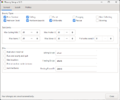
General
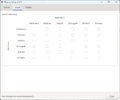
Escort
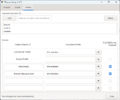
Profiles


Changelog
Click to expand
 v1.12.3 (2026-08-17)
   - fix rgambit usage when not hidden to just put away instead
   - fix to grab new bounty when available instead of waiting for should_hunt? to be true
 v1.12.2 (2026-08-14)
   - add ;ebounty settings help output covering CLI syntax for each setting value type (boolean/integer/float/array/string)
   - reference ;ebounty settings help from the main help output
   - bugfix: coerce_setting_value did not handle Float settings (e.g. wander_wait), causing ;ebounty settings wander_wait <value> to error out
 v1.12.1 (2026-08-14)
   - update help output to document previously undocumented CLI options: once, settings <key> <value>, debug, test, version
 v1.12.0 (2026-08-14)
   - add CLI support for ;ebounty basic (single run with just the basics enabled, without changing saved settings)
 v1.11.3 (2026-08-01)
   - fix to remove EXPERIENCE scraping for field exp, require new Lich to get it automatically from feed
 v1.11.2 (2026-07-08)
   - properly set start room ID
 v1.11.1 (2026-07-05)
   - add red trafel mushroom & black hook mushroom to find herb stow list method
 v1.11.0 (2026-06-07)
   - cap bandit/location crawl area at 100 rooms (Task::MAX_CRAWL_ROOMS)
   - add Task.limit_crawl_area BFS to select a contiguous region from the nearest room
   - excluded location rooms beyond the cap are added to location_boundaries automatically
 v1.10.1 (2026-05-25)
   - fix for forage_find to use distance calc of 90 for nearest only
   - fix for no forageable item found when foraging in rift due to inside/outside rooms changing
 v1.10.0 (2026-04-16)
   - add support to use alternative BOUNTY text with ;ebounty forage bounty "BOUNTY output here"
   - fix new mushroom PnC issues not calculating proper amounts in forage_bounty
 v1.9.7 (2026-03-01)
   - bugfix expedite vouchers when already ready to get new task
 v1.9.6 (2026-02-17)
   - bugfix to not try searching SG for taskmaster when already in room
 v1.9.5 (2026-02-06)
   - bugfix in forage_bounty when using optional location in CLI argument
 v1.9.4 (2026-02-04)
   - optimize location_list finding in forage_find room logic
 v1.9.3 (2026-02-04)
   - bugfix in forage_find room
 v1.9.2 (2026-01-27)
   - add CLI support for ;ebounty forage bounty
   - add CLI support for ;ebounty forage "herb" <qty> "location"
   - bugfix in heirloom_search and forage_bounty to use Claim.mine? instead of checkpcs
   - anchor ending gem names in search functions to prevent false matching on other items
   - fix resting spot for SG shattered
   - fix forage tag in starting room crash
   - fix between script(s) added erroneous commas between script parameters
 v1.9.1 (2026-01-18)
   - bugfix for running gem tracking script
 v1.9.0 (2026-01-08)
   - added support for ranger track
 v1.8.1 (2025-12-24)
   - added option to regroup before quiting if started in group
 v1.8.0 (2025-11-18)
   - added option to get a new bounty before quitting when set to "Run one bounty and quit"
 v1.7.5 (2025-11-11)
   - bugfix in minimum Lich required checks
 v1.7.4 (2025-11-11)
   - bugfix for go2_rest - settings[:resting_room] converted to array and current_room a string
 v1.7.3 (2025-10-01)
  - updates for Sailor's Grief
  - added support for uids
  - bugfix for saving settings
  - general code cleanup
 v1.7.2 (2025-09-08)
   - change requirement to 5.12.5 due to heirloom text change
 v1.7.1 (2025-09-07)
   - bugfix for change in Heirloom return messaging
 v1.7.0 (2025-09-05)
   - add option to select boost bounty type
 v1.6.5 (2025-08-15)
   - bugfix for stowing herbs
 v1.6.4 (2025-08-05)
   - remove version check for bigshot
 v1.6.3 (2025-08-03)
   - bugfix mana check when changing aspect while 650 is active
   - bugfix for hiding is 608 doesn't work
 v1.6.2 (2025-04-21)
   - bugfix for NPCs not populating quickly upon room entry with large amount of other characters
 v1.6.1 (2025-04-21)
   - bugfix for HW bounty turnin
 v1.6.0 (2025-03-29)
   - remove custom bounty and use Lich Bounty API
   - remove custom issue_command to Lich::Util.issue_command
   - remove depreciated code
   - update references of ego2 to escortgo2
 v1.5.6 (2025-03-27)
   - bugfix for set_eval not adding additional skins to skinning bounty amount
 v1.5.5 (2025-03-19)
   - remove deprecated Lich calls
 v1.5.4 (2025-03-10)
   - another bugfix for bundled skins
 v1.5.3 (2025-03-08)
   - bugfix when counting bundled skins
 v1.5.2 (2025-02-09)
   - bugfix when only foraging and needing healed
 v1.5.1 (2025-01-07)
   - bugfix for forage turn-in
 v1.5.0 (2024-12-24)
   - added buffing option when resting
   - added using a script to handling resting location
   - added option to rest at nearest table
   - added remove bounty if heirloom item gets lost
   - bugfix for bounty eval not setting EBounty.data.complete_mind
   - bugfix for ask_guard in HW
 v1.4.5 (2024-11-26)
   - added option to use the bigshot setting for a resting location
   - bugfix for profile dropdown sorting
   - bugfix stop script from looping if started without child in room
 v1.4.4 (2024-11-22)
   - bugfix in should_hunt
 v1.4.3 (2024-11-18)
   - missing criteria in should_hunt?
   - bugfix in wait_for_bounty
   - removed EBounty.data.wait - no longer used
 v1.4.2 (2024-11-16)
   - bugfix for when to rest
 v1.4.1 (2024-11-07)
   - will continue hunting after bounty complete until Bigshot Should Rest? is met
   - bugfix in setup - prevent toggling both Rest when mind is full and Keep Hunting
   - bug fix for should_hunt? spamming an experience check
   - bug fix for should_hunt? exp_pause incorrectly included
 v1.4.0 (2024-08-23)
   - expanded resting options
   - added optional death recovery support
   - added spinbutton for room delay for bandit bounties
   - asks the alchemist in HW for bounties instead of the tavernkeeper since he keeps moving
   - bugfix in gem bounty running hording script with parameters
   - bugfix in bandit hunting variables
   - removed script change log before v1.3.0 - full log: https://gswiki.play.net/Lich:Script_Ebounty
 v1.3.11 (2024-09-24)
   - fix to allow for CLI foraging without setting Gem/Default profile
 v1.3.10 (2024-08-19)
   - bugfix for ask_guard response
 v1.3.9 (2024-08-14)
   - logic fix when once_and_done is set and rejected bounty not exiting (but going out to hunt instead)
 v1.3.8 (2024-07-12)
   - add timer to not spam INFO during should_hunt? method
 v1.3.7 (2024-07-08)
   - add quiet info command to should_hunt? method to refresh stats
 v1.3.6 (2024-06-23)
   - update ebounty fog routine to match bigshot
 v1.3.5 (2024-05-15)
   - add exit if gembounty complete but using eloot sell excludes gems
 v1.3.4 (2024-05-01)
   - Change Char.prof to Stats.prof
 v1.3.3 (2024-04-13)
   - bug in escort task acceptance
 v1.3.2 (2024-04-09)
   - bug in forage for 1011 song of peace usage
 v1.3.1 (2024-04-01)
   - updated keep_hunting not to run in bigshot bounty mode. Also, added better messaging for why
   - consolidated herbalist names and switched to ID for turnin
   - updated wiki changelog
   - removed change log before v1.1.14 - full log: https://gswiki.play.net/Lich:Script_Ebounty
 v1.3.0 (2024-03-17)
   - added exclusion options for individual gems and locations
   - added help section
   - bugfix for UI title
   - removed shattered specific actions not referenced in UI (requesting spells and healing in the nexus)
 v1.2.2 (2024-03-03)
   - bugfix for gem hoarding scripts that handle selling gems
 v1.2.1 (2024-02-25)
   - bugfix for condition where ebounty may be repeatedly invoke eherbs
 v1.2.0 (2024-02-09)
   - added toggle to skip healing
   - added individual script options for rescue, escort, and hording
 v1.1.37 (2024-01-08)
   - add option to HIDE back for no-magic rooms if enabled to hide.
 v1.1.36 (2024-01-06)
   - remove forced HIDE for foraging put in by error.
 v1.1.35 (2024-01-02)
   - added check for nomagic tag before casting spells.
 v1.1.34 (2023-11-16)
   - bugfix in location check for foraging
 v1.1.33 (2023-11-10)
   - bugfix to stop trying to hand in herbs if completed
   - added check for having enough herbs for turnin
 v1.1.32 (2023-10-13)
   - update hunting settings to use bigshot fried setting instead of setting to 100
 v1.1.31 (2023-09-27)
   - bugfix when asking taskmaster for bounty in crowded room
 v1.1.30 (2023-09-26)
   - bugfix for closing containers
 v1.1.29 (2023-09-23)
   - bugfix to initialize settings when using stand alone foraging
 v1.1.28 (2023-09-23)
   - bugfix for checking if 604 is active
 v1.1.27 (2023-09-17)
   - bugfix for CLI foraging exiting when "just the basics" option toggled true
   - bugfix for black void check when foraging
 v1.1.26 (2023-09-09)
   - bugfix for CLI setting values to true/false with Ruby 3.2
 v1.1.25 (2023-07-10)
   - bugfix for HW guard
   - bugfix for Ta'Vaalor guards
   - bugfix for rejecting heirloom taskers
   - turn portals off for escorts
 v1.1.24 (2023-07-10)
   - bugfix for HW taskmaster
 v1.1.23 (2023-07-05)
   - keep silvers based on eloot setting
 v1.1.22 (2023-06-19)
   - changed the resting room to default to your bigshot profile
   - should recognize the correct town to turn in bounties
 v1.1.22 (2023-06-11)
   - removed need to set a resting room
 v1.1.21 (2023-06-11)
   - bugfix for missing category in tasks
 v1.1.20 (2023-06-04)
   - prep for new Lich 5.7.0 infomon.lic & effect-list.xml change
 v1.1.19 (2023-05-21)
   - bugfix for string error when finding rooms
   - bugfix for heirloom turnin
   - added support to wait for shattered healbot
 v1.1.18 (2023-05-21)
   - bugfix for escort tasks
 v1.1.17 (2023-05-17)
   - added missing escort locations
   - bugfix for foraging using an heirloom setting
   - bugfix for CLI herb gathering
 v1.1.16 (2023-04-22)
   - bugfix for RR purser
 v1.1.15 (2023-04-11)
   - bugfix bandit bounty locations
   - bugfix in dangerous creature regex
 v1.1.14 (2023-04-11)
   - bugfix for CLI
   - switched bounty_check to use Bounty API regex
   - moved 213 into loop during foraging so it checks each time in case the spell wears off
   - removed list of alternate foraging herb commands. Instead using in-game bounty xml for correct forage syntax
   - added option to hunt with default profile instead of exiting when no profile found
 v1.1.13 (2023-03-16)
   - added sigil of resolve to foraging
   - added flag righthand for heirloom search bounties
   - replace script.vars with Script.current.vars
   - run loot script only if loot at end of hunt
   - added strip for extra spaced in herb bounties
   - added check for right hand flag to make sure it gets turned off
 v1.1.12 (2023-03-16)
   - bugfix in rescue task regex
   - changed bundle measuring to not be silent to prevent unintented screen scroll
 v1.1.11 (2023-03-05)
   - bugfix in string literal
 v1.1.10 (2023-03-05)
   - reverted string literal changes back
   - fixed bug in child bounty
 v1.1.9 (2023-03-05)
   - reverted string literal changes
 v1.1.8 (2023-03-04)
   - added herb exclusions, rubocop fixes
 v1.1.7 (2023-03-02)
   - bug fix depositing silver
 v1.1.6 (2023-02-28)
   - fixed looting script from running in town
 v1.1.5 (2023-02-28)
   - fixed regex error in herb task location
 v1.1.4 (2023-02-23)
   - fixed regex error in targeting
 v1.1.3 (2023-02-23)
   - Added check for npcs in heirloom search
 v1.1.2 (2023-02-04)
   - added support for keeping silvers
 v1.1.1 (2023-02-01)
   - bug fix for foraging spells (waitcastrt? for assume yierka)
   - rearranged post-hunt sequence to mimic bigshot functionality.
   -fixed forage/heirloom search using empty_hands
 v1.1.0 (2023-01-27)
   - added pre and post hunt commands and scripts for foraging, heirloom search, and escorts
   - added bad room entries for bandits that will accept UID's
   - added spell support for heirloom search bounties
   - added 1035 to foraging and heirloom searching
   - think I finally squashed the repeating Song of Peace bug
 v1.0.32 (2023-01-26)
   - bugfix for heirloom searching
 v1.0.31 (2023-01-24)
   - reordered casting of song of peace during foraging and stopping it when done.
   - added a double check for heirloom searching
 v1.0.30 (2023-01-23)
   - fix bad Widowmaker Rd room#
 v1.0.29 (2023-01-23)
   - fix bugfix in variable list from v1.0.29
 v1.0.28 (2023-01-23)
   - added herbalist to Mist Harbor
 v1.0.27 (2023-01-22)
   - refreshed spell active before casting foraging helper spells
   - add check for silver deposit after bounty turn-in
   - fixed bug in bundled skin eval
 v1.0.26 (2023-01-21)
   - fixed bug in herb turnin when caught in RT
   - fixed prep-hunt command to run scripts consistent with bigshot functionality
 v1.0.25 (2023-01-19)
   - Fix badlist rooms and add bad logging road rooms
 v1.0.24 (2023-01-19)
   - Correct another typo in herb finding method
 v1.0.23 (2023-01-16)
   - Correct typo in herb finding method
 v1.0.22 (2023-01-12)
   - Change EBounty.data.location_start to use nearest instead of first in list
 v1.0.21 (2023-01-02)
   - typo in bug fix
 v1.0.20 (2023-01-02)
   -bug fix moves minor sanct outside foraging loop to stop it spamming
 v1.0.19 (2023-01-01)
   -bug fix to stop voucher use when bounty boost is active
 v1.0.18 (2023-01-01)
   - added bounty boost to available options
   - added foraging enhancements - see foraging tab on ui
   - changed the herb searching routine to  try and eliminate false positives/negatives
   - updated infomon and spell-list version requirements to support 650 tracking
   - added CLI herb foraging independent of bounty - ;ebounty forage "<type of herb>" <number to find>
 v1.0.17 (2022-12-27)
   - ensuring following scripts are stopped before starting ebounty: go2, echild, ego2, bigshot
 v1.0.16 (2022-12-22)
   - typo fix for the bugfix for herbalist rooms using UID's
 v1.0.15 (2022-12-22)
   - bugfix for herbalist rooms using UID's
 v1.0.14 (2022-12-20)
   - updated herbalist rooms to use UID's for instance compatibility
 v1.0.13 (2022-12-19)
   - add regex for opening an item
 v1.0.12 (2022-12-15)
   - made resting room a required parameter
   - consolidated odd herb names
 v1.0.11 (2022-12-12)
   - foraging name match fix
 v1.0.10 (2022-12-11)
   - fixed foraging herb matching bug
 v1.0.9 (2022-12-09)
   - bug fix for checkbounty not populating quickly
 v1.0.8 (2022-12-06)
   - moved post hunt routine to after forage turn-in to avoid trashing foraged item
   - bug fix for foraging in the red forest
 v1.0.7 (2022-12-05)
   - bug fix for hunting sequence resting
 v1.0.6 (2022-12-5)
   - fixed bug in rescue bounty sequencing.
 v1.0.5 (2022-12-3)
   - bugfix for bounty_eval
   - various foraging name corrections
   - pre/post hunting bigshot routines (from default profile) added to escort bounties
 v1.0.4 (2022-11-30)
   - bug fix on container opening
   - adjusted hunting sequence due to bigshot bounty_eval changing
   - set bounty_eval to empty string on exit
   - updated required versions to Lich 5.6.2, Bigshot 4.13.12, and Infomon 1.18.16
   - regex fix for completed task
 v1.0.3 (2022-11-28)
   - changed container method to use "inventory container" instead of GameObj.inv
 v1.0.2 (2022-11-27)
   - Fix to targeting not using bigshot routines
 v1.0.1 (2022-11-26)
   - hedgehog sack messaging
   - fixed herb names
   - support for Bigshot fogging options
   - child bounty fail bug
   - Fix for grizzled targeting when user only kills bounty creatures
 v1.0.0 (2022-05-18)
   - initial framework and ui
Reference
| Third-Party Software - edit |
|---|
| Lich Installation: Lich |
| Downloadable Lich Scripts: Go2 | Map | Repository | Popular Scripts |