Engraver's Shop
Jump to navigation
Jump to search
Engravings
There are three types of engravings done by the Master Engraver: ASCII, text, and image. The customer need only pick one at the time of purchase; the other three can be toggled using ENGRAVE SHIELD <option> when standing in the engraver's shop.
>engrave shield ascii
(Your engraving format has been changed to ASCII art.)
Examples
The following are examples of the three types of engravings:
ASCII
>engrave shield ascii
(Your engraving format has been changed to ASCII art.)
>
>look shield
Emblazoned on the shield is a coat of arms.

                  _________________
                  \_____           \
                        \------\    \
                                \    \
                                 \    \
                       ^_^       |     |
                      /@ @\      |     |
                    _ \_^_/ _    |     |
                   / \/   \/ \   |     |
                   \  |   |  /   |     |
             -      \ \___/ /   /     /
             \ \     \|   |/   /     /
              \ \-----^---^---     /
               \_________________/


                  Twilight Hall

>
Image
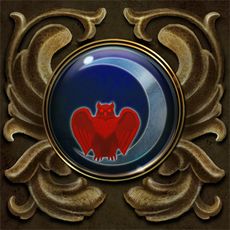
Note: In order to view the IMAGE option, the FLAGS Portrait option must be set to ON. If it isn't, the TEXT option for engraving will be shown instead.
>engrave shield image
(Your engraving format has been changed to a image description.)
>look shield
Emblazoned on the shield is a coat of arms.

Text
>engrave shield text
(Your engraving format has been changed to a text description.)
>look shield
The shield has been engraved with the image of a scarlet red owl perched inside a silvery waxing crescent moon.  The image is set against a background of the deepest blue.